PowerDirector – Video Editor App for Android
Cyberlink Corp
Jun 4, 2014
Feb 6, 2026
339.05 MB
16.1.0
9
100,000,000+

Description
PowerDirector – Video Editor App for Android
PowerDirector एक शक्तिशाली और लोकप्रिय वीडियो एडिटिंग ऐप है जो Android यूजर्स के लिए विशेष रूप से डिज़ाइन किया गया है। यह ऐप मोबाइल पर प्रोफेशनल-स्तर की वीडियो एडिटिंग को संभव बनाता है और लाखों यूजर्स द्वारा विश्वसनीय माना जाता है। CyberLink द्वारा विकसित यह वीडियो एडिटर ऐप न केवल शुरुआती लोगों के लिए उपयोगी है बल्कि प्रोफेशनल कंटेंट क्रिएटर्स के लिए भी एक बेहतरीन टूल साबित होता है।
आज के डिजिटल युग में जहां सोशल मीडिया पर वीडियो कंटेंट की मांग तेजी से बढ़ रही है, वहां PowerDirector जैसे ऐप्स की जरूरत और भी महत्वपूर्ण हो गई है। YouTube, Instagram, Facebook, और TikTok जैसे प्लेटफॉर्म्स पर आकर्षक वीडियो बनाने के लिए यह ऐप सभी आवश्यक फीचर्स प्रदान करता है।
इस लेख में हम PowerDirector Video Editor App की सभी विशेषताओं, फायदों, और उपयोग के तरीकों पर विस्तार से चर्चा करेंगे।
What is PowerDirector Video Editor App?
PowerDirector एक फुल-फीचर्ड वीडियो एडिटिंग एप्लीकेशन है जो आपके स्मार्टफोन को एक पोर्टेबल एडिटिंग स्टूडियो में बदल देती है। यह ऐप मल्टी-लेयर एडिटिंग, स्पेशल इफेक्ट्स, ट्रांजीशन, टाइटल, और बहुत कुछ प्रदान करता है। CyberLink की टीम ने इस ऐप को इस तरह से डिज़ाइन किया है कि यह सभी स्किल लेवल के यूजर्स के लिए उपयुक्त हो।
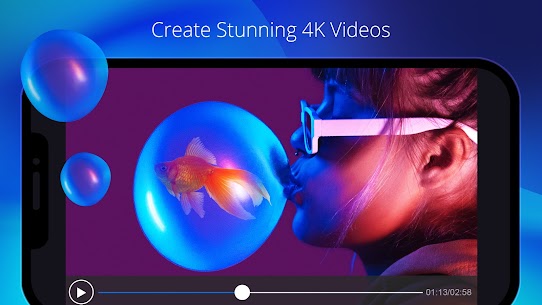
यह Android वीडियो एडिटर 4K रेज़ोल्यूशन तक वीडियो एडिटिंग को सपोर्ट करता है और आपको प्रोफेशनल क्वालिटी के आउटपुट देने में सक्षम है। इसका इंटरफेस यूजर-फ्रेंडली है जिससे कोई भी व्यक्ति आसानी से अपने वीडियो को एडिट कर सकता है।
Key Features of PowerDirector
Multi-Track Timeline Editing
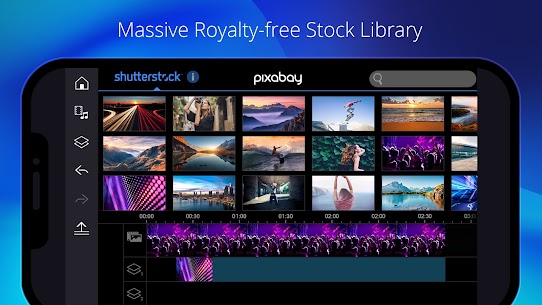
PowerDirector की सबसे खास विशेषता इसका मल्टी-ट्रैक टाइमलाइन है जो आपको एक साथ कई वीडियो, ऑडियो, और इफेक्ट्स लेयर्स पर काम करने की सुविधा देता है। यह फीचर प्रोफेशनल एडिटिंग के लिए बेहद जरूरी है और PowerDirector इसे मोबाइल पर बखूबी उपलब्ध कराता है।
आप विभिन्न क्लिप्स को ड्रैग और ड्रॉप करके व्यवस्थित कर सकते हैं, उन्हें ट्रिम, स्प्लिट, और मर्ज कर सकते हैं। टाइमलाइन पर जूम इन और जूम आउट की सुविधा एडिटिंग को और भी सटीक बनाती है।
Video Effects and Transitions
यह वीडियो एडिटिंग ऐप सैकड़ों प्रीबिल्ट इफेक्ट्स और ट्रांजीशन के साथ आता है। आप अपने वीडियो को सिनेमैटिक लुक देने के लिए विभिन्न फिल्टर्स, ओवरले, और कलर ग्रेडिंग टूल्स का उपयोग कर सकते हैं।
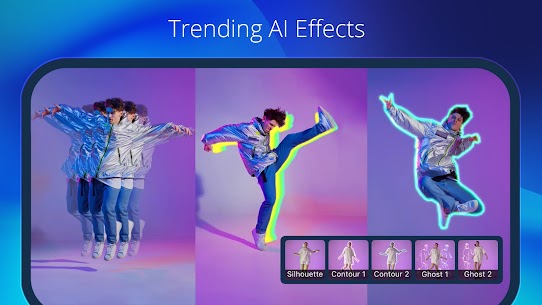
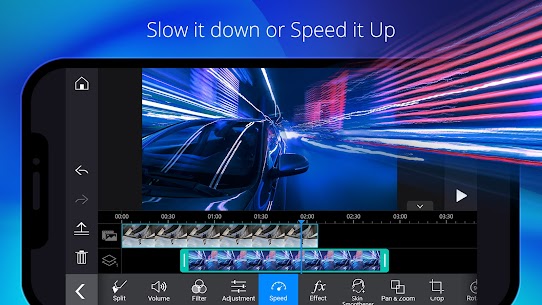
PowerDirector में स्लो मोशन, फास्ट फॉरवर्ड, रिवर्स वीडियो, और ग्लिच इफेक्ट्स जैसे ट्रेंडिंग फीचर्स भी उपलब्ध हैं। ये सभी टूल्स आपके कंटेंट को यूनीक और आकर्षक बनाने में मदद करते हैं।
Chroma Key (Green Screen)
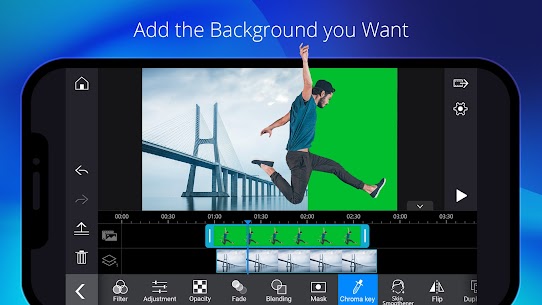
PowerDirector में क्रोमा की (ग्रीन स्क्रीन) फीचर उपलब्ध है जो आमतौर पर प्रोफेशनल एडिटिंग सॉफ्टवेयर में ही मिलता है। इस फीचर के जरिए आप किसी भी सॉलिड कलर बैकग्राउंड को हटाकर अपनी पसंद का बैकग्राउंड लगा सकते हैं।
यह फीचर विशेष रूप से उन कंटेंट क्रिएटर्स के लिए उपयोगी है जो क्रिएटिव और इमेजिनेटिव वीडियो बनाना चाहते हैं। YouTube वीडियो, प्रेजेंटेशन, या सोशल मीडिया कंटेंट के लिए यह बेहद काम का टूल है।
Audio Editing Tools
PowerDirector केवल वीडियो तक सीमित नहीं है, बल्कि यह शक्तिशाली ऑडियो एडिटिंग टूल्स भी प्रदान करता है। आप अपनी ऑडियो क्लिप्स को ट्रिम कर सकते हैं, वॉल्यूम एडजस्ट कर सकते हैं, और विभिन्न साउंड इफेक्ट्स जोड़ सकते हैं।
ऐप में बिल्ट-इन म्यूजिक लाइब्रेरी है जहां से आप रॉयल्टी-फ्री म्यूजिक का चयन कर सकते हैं। इसके अलावा, आप अपनी खुद की ऑडियो फाइलें भी इम्पोर्ट कर सकते हैं और वॉयसओवर रिकॉर्ड कर सकते हैं।
Text and Title Animations
PowerDirector में टेक्स्ट और टाइटल एनिमेशन के लिए कई टेम्पलेट्स उपलब्ध हैं। आप अपने वीडियो में प्रोफेशनल-लुकिंग टाइटल, कैप्शन, और सबटाइटल जोड़ सकते हैं।
फॉन्ट स्टाइल, साइज, कलर, और एनिमेशन को पूरी तरह से कस्टमाइज किया जा सकता है। यह फीचर विशेष रूप से ट्यूटोरियल वीडियो, प्रोडक्ट रिव्यू, और एजुकेशनल कंटेंट के लिए बेहद उपयोगी है।
PowerDirector vs Other Video Editing Apps
| Feature | PowerDirector | Other Video Editors |
|---|---|---|
| Multi-Track Timeline | ✅ उपलब्ध (असीमित ट्रैक) | ⚠️ सीमित या बेसिक |
| 4K Video Support | ✅ पूर्ण 4K सपोर्ट | ✅ कुछ में उपलब्ध |
| Chroma Key (Green Screen) | ✅ एडवांस्ड क्रोमा की फीचर | ⚠️ बहुत कम ऐप्स में |
| Export Quality | ✅ बिना वॉटरमार्क (प्रीमियम) | ⚠️ अधिकतर में वॉटरमार्क |
| Effects Library | ✅ 500+ इफेक्ट्स और ट्रांजीशन | ⚠️ सीमित कलेक्शन |
| User Interface | ✅ यूजर-फ्रेंडली और इंट्यूटिव | ⚠️ कुछ में जटिल |
How to Download and Install PowerDirector
PowerDirector को डाउनलोड और इंस्टॉल करना बेहद आसान है। आप इसे Google Play Store से सीधे डाउनलोड कर सकते हैं। यहां स्टेप-बाय-स्टेप प्रक्रिया दी गई है:
सबसे पहले अपने Android डिवाइस पर Google Play Store खोलें। सर्च बार में “PowerDirector” टाइप करें और CyberLink की ऑफिशियल ऐप को खोजें।
“Install” बटन पर क्लिक करें और ऐप को डाउनलोड होने दें। इंस्टॉलेशन पूरी होने के बाद, ऐप को ओपन करें और जरूरी परमिशन दें जैसे कि स्टोरेज एक्सेस, कैमरा, और माइक्रोफोन।
पहली बार ऐप खोलने पर आपको एक छोटा ट्यूटोरियल दिखाया जाएगा जो आपको बेसिक फीचर्स समझने में मदद करेगा। इसके बाद आप तुरंत अपनी पहली वीडियो प्रोजेक्ट शुरू कर सकते हैं।
Using PowerDirector – Step by Step Guide
Creating a New Project
PowerDirector में नया प्रोजेक्ट बनाना बहुत सरल है। ऐप खोलने के बाद “New Project” बटन पर टैप करें। आपको अपने वीडियो का आस्पेक्ट रेशियो चुनने का ऑप्शन मिलेगा – 16:9 (YouTube के लिए), 9:16 (Instagram Stories/Reels के लिए), या 1:1 (Instagram Posts के लिए)।
आस्पेक्ट रेशियो सेलेक्ट करने के बाद आप अपनी गैलरी से वीडियो क्लिप्स और फोटोज़ इम्पोर्ट कर सकते हैं। PowerDirector आपको एक साथ कई फाइलें सेलेक्ट करने की सुविधा देता है जिससे समय की बचत होती है।
Editing Your Video
एक बार जब आपकी क्लिप्स टाइमलाइन में आ जाएं, तो आप एडिटिंग शुरू कर सकते हैं। किसी भी क्लिप पर टैप करके आप उसे ट्रिम, स्प्लिट, या डुप्लीकेट कर सकते हैं। PowerDirector का इंटरफेस इतना सहज है कि नए यूजर्स भी जल्दी सीख जाते हैं।
आप अपने वीडियो में म्यूजिक जोड़ने के लिए “Audio” टैब पर जाएं और अपनी पसंद का ट्रैक चुनें। टेक्स्ट जोड़ने के लिए “Text” टैब का उपयोग करें और विभिन्न फॉन्ट और एनिमेशन स्टाइल्स में से चुनें।
Adding Effects and Filters
PowerDirector में इफेक्ट्स जोड़ना बेहद मजेदार है। “Effects” सेक्शन में जाएं और सैकड़ों विकल्पों में से चुनें। आप ग्लिच इफेक्ट, लाइट लीक्स, पार्टिकल इफेक्ट्स, और बहुत कुछ लगा सकते हैं।
फिल्टर्स की मदद से आप अपने वीडियो को सिनेमैटिक या विंटेज लुक दे सकते हैं। प्रत्येक इफेक्ट को इंटेंसिटी और ड्यूरेशन के हिसाब से एडजस्ट किया जा सकता है। यह वीडियो एडिटर आपको पूर्ण क्रिएटिव कंट्रोल देता है।
Exporting Your Video
जब आपकी एडिटिंग पूरी हो जाए, तो “Export” बटन पर टैप करें। PowerDirector आपको विभिन्न रेज़ोल्यूशन और क्वालिटी सेटिंग्स चुनने का ऑप्शन देता है – 720p, 1080p, या 4K।
आप अपने वीडियो को सीधे YouTube, Facebook, Instagram, या TikTok पर शेयर कर सकते हैं। एक्सपोर्ट स्पीड काफी तेज है और प्रीमियम वर्जन में कोई वॉटरमार्क नहीं होता।
PowerDirector Premium Features
PowerDirector का फ्री वर्जन काफी सुविधाओं के साथ आता है, लेकिन प्रीमियम सब्सक्रिप्शन कुछ एक्सक्लूसिव फीचर्स अनलॉक करती है। प्रीमियम यूजर्स को वॉटरमार्क-फ्री एक्सपोर्ट, असीमित प्रोजेक्ट्स, और प्रीमियम इफेक्ट्स का एक्सेस मिलता है।
इसके अलावा, प्रीमियम मेंबर्स को रेगुलर अपडेट्स और नए इफेक्ट्स पैक्स मिलते रहते हैं। एडवरटाइजमेंट भी हटा दिए जाते हैं जिससे एडिटिंग एक्सपीरियंस और भी बेहतर हो जाता है। CyberLink की प्रीमियम सर्विस काफी किफायती मानी जाती है जब आप इसकी सभी सुविधाओं को देखते हैं।
Benefits of Using PowerDirector
PowerDirector का उपयोग करने के कई फायदे हैं। सबसे पहला फायदा यह है कि यह एक ऑल-इन-वन सॉल्यूशन है जो आपको अलग-अलग ऐप्स की जरूरत नहीं पड़ने देता। वीडियो एडिटिंग से लेकर ऑडियो मिक्सिंग और कलर ग्रेडिंग तक सब कुछ एक ही प्लेटफॉर्म पर उपलब्ध है।
दूसरा बड़ा फायदा इसकी मोबिलिटी है। आप कहीं भी, कभी भी अपने स्मार्टफोन पर प्रोफेशनल क्वालिटी के वीडियो बना सकते हैं। यह विशेष रूप से उन कंटेंट क्रिएटर्स के लिए वरदान है जो लगातार ट्रैवल करते हैं या जिनके पास डेस्कटॉप सेटअप नहीं है।
तीसरा फायदा इसका यूजर-फ्रेंडली इंटरफेस है जो सीखने की प्रक्रिया को आसान बनाता है। PowerDirector का सपोर्ट सिस्टम भी बेहतरीन है – ऑनलाइन ट्यूटोरियल्स, कम्युनिटी फोरम्स, और कस्टमर सपोर्ट हमेशा मदद के लिए तैयार रहते हैं।
PowerDirector for Content Creators
YouTube, Instagram, और TikTok क्रिएटर्स के लिए PowerDirector एक आदर्श टूल है। इसमें विशेष रूप से सोशल मीडिया के लिए डिज़ाइन किए गए टेम्पलेट्स और प्रीसेट्स हैं जो कंटेंट क्रिएशन को तेज और आसान बनाते हैं।
आप ट्रेंडिंग इफेक्ट्स, म्यूजिक, और ट्रांजीशन का उपयोग करके अपने वीडियो को वायरल बना सकते हैं। PowerDirector रेगुलर अपडेट्स के साथ नए ट्रेंड्स को फॉलो करता रहता है। इसकी एआई-पावर्ड फीचर्स जैसे ऑटो कैप्शन और बैकग्राउंड रिमूवल भी काफी मददगार साबित होते हैं।
प्रोफेशनल व्लॉगर्स और डिजिटल मार्केटर्स भी PowerDirector का भरपूर उपयोग करते हैं क्योंकि यह क्विक एडिट्स और लास्ट-मिनट चेंजेस के लिए परफेक्ट है। आप अपने स्मार्टफोन से सीधे हाई-क्वालिटी प्रोमोशनल वीडियो बना सकते हैं।
Tips and Tricks for Better Video Editing
PowerDirector में बेहतर वीडियो बनाने के लिए कुछ टिप्स और ट्रिक्स हैं। सबसे पहले, हमेशा अपने वीडियो को प्लान करें और एक स्क्रिप्ट या स्टोरीबोर्ड तैयार करें। यह आपके एडिटिंग टाइम को काफी कम कर देता है।
दूसरा, लेयरिंग का सही उपयोग करें। मल्टी-लेयर एडिटिंग की मदद से आप अपने वीडियो को और अधिक डायनामिक और प्रोफेशनल बना सकते हैं। बैकग्राउंड म्यूजिक को हमेशा लोअर वॉल्यूम पर रखें ताकि वॉयसओवर या मुख्य ऑडियो साफ सुनाई दे।
तीसरा, कलर करेक्शन और ग्रेडिंग को नजरअंदाज न करें। PowerDirector में कलर व्हील और एडवांस्ड कलर टूल्स हैं जो आपके वीडियो को सिनेमैटिक लुक देने में मदद करते हैं। ट्रांजीशन का इस्तेमाल सावधानी से करें – बहुत ज्यादा ट्रांजीशन वीडियो को अव्यवस्थित बना सकते हैं।
System Requirements and Compatibility
PowerDirector Android 5.0 (Lollipop) और उसके बाद के वर्जन को सपोर्ट करता है। हालांकि, बेहतर परफॉर्मेंस के लिए Android 8.0 या उससे ऊपर का वर्जन रिकमेंडेड है। कम से कम 2GB RAM और पर्याप्त स्टोरेज स्पेस होना जरूरी है।
4K वीडियो एडिटिंग के लिए ज्यादा पावरफुल डिवाइस की जरूरत होती है – कम से कम 4GB RAM और नया प्रोसेसर। PowerDirector का ऐप साइज लगभग 100MB है लेकिन अतिरिक्त इफेक्ट्स और कंटेंट डाउनलोड करने पर यह बढ़ सकता है।
अधिकतर मॉडर्न Android स्मार्टफोन्स पर यह वीडियो एडिटर ऐप स्मूथली चलता है। Samsung, OnePlus, Xiaomi, Realme, और अन्य लोकप्रिय ब्रांड्स के साथ पूर्ण कम्पैटिबिलिटी है।
FAQs
PowerDirector क्या है?
PowerDirector CyberLink द्वारा विकसित एक प्रोफेशनल वीडियो एडिटिंग ऐप है जो Android यूजर्स को मोबाइल पर हाई-क्वालिटी वीडियो बनाने की सुविधा देता है। इसमें मल्टी-ट्रैक एडिटिंग, 4K सपोर्ट, क्रोमा की, और सैकड़ों इफेक्ट्स शामिल हैं।
क्या PowerDirector फ्री है?
हां, PowerDirector का बेसिक वर्जन पूरी तरह से फ्री है। हालांकि, फ्री वर्जन में एक्सपोर्टेड वीडियो पर वॉटरमार्क आता है। प्रीमियम सब्सक्रिप्शन लेने पर वॉटरमार्क हटाया जा सकता है और अतिरिक्त फीचर्स अनलॉक होते हैं।
PowerDirector में वीडियो एक्सपोर्ट कैसे करें?
वीडियो एडिटिंग पूरी करने के बाद ऊपरी दाएं कोने में एक्सपोर्ट आइकन पर टैप करें। अपनी पसंद की क्वालिटी सेटिंग्स (720p, 1080p, 4K) चुनें और “Start” पर क्लिक करें। एक्सपोर्ट पूरा होने पर आप वीडियो को सीधे सोशल मीडिया पर शेयर कर सकते हैं।
PowerDirector में Green Screen कैसे उपयोग करें?
PowerDirector में ग्रीन स्क्रीन फीचर का उपयोग करने के लिए, अपनी क्लिप सेलेक्ट करें और “Chroma Key” टूल पर जाएं। ग्रीन या जो भी कलर रिमूव करना है उसे सेलेक्ट करें, और फिर अपना पसंदीदा बैकग्राउंड इम्पोर्ट करें। सेंसिटिविटी स्लाइडर से फाइन-ट्यून करें।
PowerDirector प्रीमियम की कीमत क्या है?
PowerDirector प्रीमियम सब्सक्रिप्शन की कीमत क्षेत्र के अनुसार अलग-अलग हो सकती है। आमतौर पर मासिक सब्सक्रिप्शन ₹400-500 के आसपास होती है, जबकि वार्षिक प्लान में काफी छूट मिलती है। Google Play Store पर वर्तमान कीमत चेक करें।
क्या PowerDirector में AI फीचर्स हैं?
हां, PowerDirector में कई एआई-पावर्ड फीचर्स हैं जैसे ऑटोमैटिक कैप्शन जनरेशन, बैकग्राउंड रिमूवल, ऑब्जेक्ट ट्रैकिंग, और स्मार्ट स्टेबिलाइजेशन। ये फीचर्स एडिटिंग प्रोसेस को तेज और आसान बनाते हैं।
PowerDirector में म्यूजिक कैसे जोड़ें?
म्यूजिक जोड़ने के लिए टाइमलाइन में “Audio” बटन पर टैप करें। आप ऐप की बिल्ट-इन म्यूजिक लाइब्रेरी से गाने चुन सकते हैं या अपनी डिवाइस से कस्टम ऑडियो इम्पोर्ट कर सकते हैं। वॉल्यूम, फेड इन/आउट, और ट्रिमिंग भी कर सकते हैं।
PowerDirector कौन से फॉर्मेट्स सपोर्ट करता है?
PowerDirector अधिकतर लोकप्रिय वीडियो फॉर्मेट्स सपोर्ट करता है जैसे MP4, AVI, MOV, और MKV। इमेज फॉर्मेट्स में JPG, PNG, और GIF शामिल हैं। ऑडियो फॉर्मेट्स में MP3, AAC, और WAV सपोर्टेड हैं।
What's new
Upgrade now for smarter AI tools and fresh music!
• Your personal AI DJ helps you find the right music fast with AI-powered prompt search.
• Enjoy the redesigned Music Room—sleeker, smarter, and re-categorized for speed.
Catch the latest AI short-video trend with Motion Swap: import a character photo and a reference clip to create stunning motion in one tap.
Start creating your unique video style today!
Video
Images